ตัวอย่างโค้ด Calendar ด้วย JavaScript
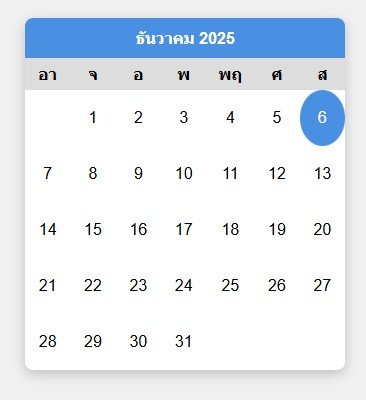
ตัวอย่าง JavaScript Calendar แบบง่าย ๆ ที่สร้างตารางเดือนพร้อมวันที่ โดยไม่ต้องใช้ไลบรารีเสริม
เตรียมตัวก่อนเขียนโค้ด- ใช้ Date() เพื่อหาวันที่ปัจจุบัน, วันแรกของเดือน และจำนวนวันในเดือน
- สร้าง <table> โดยวนลูป 6 แถว × 7 คอลัมน์
- ไฮไลท์วันปัจจุบันด้วย CSS (.today)
- แสดงชื่อเดือนเป็นภาษาไทย
body {
    font-family: sans-serif;
    display: flex;
    justify-content: center;
    padding: 20px;
    background: #f0f0f0;
  }
  .calendar {
    width: 320px;
    background: #fff;
    border-radius: 8px;
    box-shadow: 0 4px 12px rgba(0,0,0,.2);
    overflow: hidden;
  }
  .header {
    text-align: center;
    background: #4a90e2;
    color: #fff;
    padding: 10px;
    font-weight: bold;
  }
  table {
    width: 100%;
    border-collapse: collapse;
  }
  th {
    background: #ddd;
    padding: 6px;
  }
  td {
    text-align: center;
    padding: 8px;
    height: 40px;
  }
  td.today {
    background: #4a90e2;
    color: #fff;
    border-radius: 50%;
}<div class="calendar">
<div class="header" id="monthYear"></div>
<table>
<thead>
<tr>
<th>อา</th>
<th>จ</th>
<th>อ</th>
<th>พ</th>
<th>พฤ</th>
<th>ศ</th>
<th>ส</th>
</tr>
</thead>
<tbody id="calendarBody"></tbody>
</table>
</div>function generateCalendar() {
const today = new Date();
const month = today.getMonth(); // เดือนปัจจุบัน (0-11)
const year = today.getFullYear();
// แสดงชื่อเดือนและปี
const monthNames = [
"มกราคม","กุมภาพันธ์","มีนาคม","เมษายน","พฤษภาคม","มิถุนายน",
"กรกฎาคม","สิงหาคม","กันยายน","ตุลาคม","พฤศจิกายน","ธันวาคม"
];
document.getElementById("monthYear").innerText = monthNames[month] + " " + year;
const firstDay = new Date(year, month, 1).getDay(); // วันแรกของเดือน (0=อาทิตย์)
const daysInMonth = new Date(year, month+1, 0).getDate(); // จำนวนวันในเดือน
let calendarBody = document.getElementById("calendarBody");
calendarBody.innerHTML = "";
let date = 1;
for (let i = 0; i < 6; i++) { // สร้าง 6 แถว
let row = document.createElement("tr");
for (let j = 0; j < 7; j++) {
let cell = document.createElement("td");
if (i === 0 && j < firstDay) {
cell.innerHTML = "";
} else if (date > daysInMonth) {
break;
} else {
cell.innerHTML = date;
if (date === today.getDate()) {
cell.classList.add("today"); // ไฮไลท์วันปัจจุบัน
}
date++;
}
row.appendChild(cell);
}
calendarBody.appendChild(row);
}
}
generateCalendar();
JavaScript Tutorial
2025-12-06 01:35:44